
Download Scribe by Lexigo – AI Media Content Management Tool for Global Teams
Overview
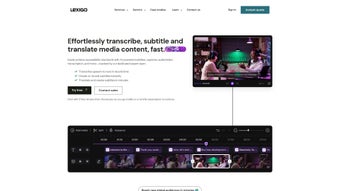
Scribe by Lexigo is a cloud‑based, AI‑enhanced media content management platform that aims to simplify the entire lifecycle of audio‑visual assets for businesses that operate on a global scale. Built on a secure, government‑grade infrastructure, Scribe provides an intuitive web editor where users can upload, transcribe, translate, subtitle, and publish media without leaving the browser. The application leverages state‑of‑the‑art speech‑to‑text algorithms to deliver near‑real‑time transcription in over 40 languages, while its neural machine translation engine can automatically generate subtitles for any target market within seconds. Whether you are a marketing team looking to repurpose a webinar for multiple regional channels, a media house needing rapid captioning for compliance, or an e‑learning provider localizing video lessons, Scribe offers a single, unified workspace that eliminates the need for a patchwork of disparate tools.
Beyond transcription and translation, Scribe includes advanced editing capabilities such as audio‑to‑video conversion, custom watermark insertion, and frame‑accurate subtitle timing. Collaboration is baked in: multiple team members can comment, assign tasks, and approve edits in real time, ensuring that production pipelines move swiftly and transparently. The platform also integrates with popular social media APIs, allowing content to be automatically reformatted for Instagram Stories, TikTok, YouTube Shorts, and other formats with a single click. While the service is subscription‑based with a pay‑as‑you‑go model, it offers a short free trial that lets prospective users explore core functionalities before committing. The only notable drawbacks are its reliance on a stable internet connection and a trial period that some may find too brief to fully assess the ROI.
From a security perspective, Scribe complies with GDPR, ISO 27001, and SOC 2 standards, meaning that every file uploaded is encrypted both in transit (TLS 1.3) and at rest (AES‑256). Role‑based access controls and multi‑factor authentication further protect sensitive corporate media. Pricing is transparent: users pay per minute of processed audio for transcription and per minute for translation, with volume discounts available for enterprises that commit to larger blocks of usage. The platform also provides detailed invoicing and usage analytics, allowing finance teams to track spend across departments. In short, Scribe is designed to be a “single pane of glass” for global media teams that need speed, accuracy, and compliance—all without the overhead of managing multiple legacy solutions.
Core Features That Power Global Media Workflows
- AI‑Driven Speech‑to‑Text: Automatic transcription with up to 98% accuracy in 40+ languages, supporting both pre‑recorded files and live streaming audio.
- Instant Multilingual Subtitling: One‑click subtitle generation and export in SRT, VTT, or embedded formats, with customizable styling options.
- Neural Machine Translation: Real‑time translation of transcriptions into over 60 target languages, optimized for regional idioms and industry terminology.
- Audio‑to‑Video Conversion: Turn podcasts, voice‑overs, or interview recordings into shareable video clips with auto‑generated waveforms.
- Custom Watermarking & Branding: Apply logos, text overlays, or semi‑transparent graphics to protect intellectual property.
- Collaboration Suite: Role‑based access, comment threads, task assignments, and version history for seamless team coordination.
- Social Media Optimization: Auto‑crop, resize, and reformat videos for platforms like Instagram Reels, TikTok, LinkedIn, and Facebook.
- Secure Cloud Storage: End‑to‑end encryption on servers meeting banking and government security standards, with GDPR‑compliant data handling.
- API & Workflow Integration: Webhooks, RESTful APIs, and Zapier connectors to embed Scribe into existing CMS, LMS, or marketing automation stacks.
- Analytics Dashboard: Track transcription turnaround time, translation cost, audience engagement, and subtitle performance metrics.
Each of these features is designed to reduce manual effort and accelerate time‑to‑market. For example, a marketing manager can upload a 30‑minute product demo, let Scribe generate an English transcript, translate it into Spanish, French, and Japanese, and then push the subtitled videos directly to regional YouTube channels—all within an hour. The AI models continuously learn from user corrections, meaning that the more you use the platform, the smarter it becomes. Moreover, the security architecture includes multi‑factor authentication, role‑based permissions, and encrypted at‑rest storage, ensuring that sensitive corporate content remains protected against unauthorized access.
The platform’s subtitle editor also supports advanced styling such as custom fonts, colors, and positioning, making it possible to meet brand guidelines without third‑party tools. For broadcasters, the frame‑accurate timing feature ensures compliance with regional captioning regulations, while the analytics dashboard provides a clear view of subtitle error rates and viewer retention. Finally, the API suite allows developers to trigger automatic transcription whenever a new file lands in a corporate DAM, retrieve the finished subtitle file, and push it to a publishing queue, effectively turning Scribe into a silent back‑office worker that never sleeps.
Installation, Setup, and Cross‑Platform Compatibility
Because Scribe by Lexigo is a web‑based SaaS solution, there is no traditional “install” process for desktop operating systems. Users simply navigate to scribe.lexigo.com, create an account, and begin uploading media. The platform is optimized for modern browsers such as Chrome, Edge, Firefox, and Safari, and automatically adapts to different screen resolutions, making it equally usable on laptops, desktops, and tablets.
Step‑by‑Step Onboarding
- Sign Up: Register with an email address or use SSO via Google Workspace, Microsoft Azure AD, or Okta.
- Choose a Plan: Select the pay‑as‑you‑go tier or an annual subscription; a 7‑day free trial is available for all new accounts.
- Verify Identity: Complete two‑factor authentication to unlock full feature access.
- Upload Media: Drag‑and‑drop video or audio files, or paste a public URL to begin transcription.
- Configure Settings: Choose source language, target subtitle languages, and watermark preferences.
- Generate & Edit: Let the AI produce a transcript, then refine it using the built‑in editor; add timestamps or custom styles as needed.
- Export & Publish: Download subtitles in the desired format or push the finished video directly to integrated social media accounts.
For organizations that require tighter integration with existing digital asset management (DAM) systems, Scribe provides RESTful APIs and webhook triggers that can be configured from the “Developer” tab in the user dashboard. These APIs enable automated ingestion of new media files, retrieval of completed subtitles, and real‑time status updates, making it possible to embed Scribe into CI/CD pipelines for continuous content delivery. Detailed SDKs are available for JavaScript, Python, and Java, allowing developers to build custom workflows that automatically tag assets with metadata such as language, transcription confidence score, and subtitle format.
Supported Operating Systems & Devices: While the core application runs in the browser, Scribe’s mobile companion apps are available for iOS 14+ and Android 9+, allowing on‑the‑go transcription from smartphones or tablets. The iOS app leverages Apple’s Secure Enclave for credential storage, while the Android app supports biometric authentication.
Because all processing occurs in the cloud, the performance of Scribe depends primarily on internet bandwidth. The platform is built on a globally distributed CDN, so users in North America, Europe, and Asia experience comparable latency. For enterprises with strict data residency requirements, Lexigo offers dedicated regional data centers that can be selected during onboarding. In addition, a lightweight desktop “wrapper” built with Electron is available for users who prefer a dedicated windowed experience on Windows 10+ or macOS 11+, though all heavy‑lifting still occurs on the back‑end servers.
Pros, Cons, and Frequently Asked Questions
Pros
- Highly accurate AI transcription and translation across a wide language set.
- All‑in‑one web editor eliminates the need for multiple third‑party tools.
- Government‑grade security and GDPR compliance protect sensitive media.
- Robust collaboration features streamline team workflows.
- Seamless integration with social platforms and API connectivity.
- Scalable cloud infrastructure ensures fast processing regardless of file size.
- Detailed usage analytics help control costs and demonstrate ROI.
Cons
- Requires a stable internet connection; offline work is not supported.
- Free trial period (7 days) may be too short for large‑scale evaluation.
- Pay‑as‑you‑go pricing can become costly for high‑volume transcription.
- No native desktop client for Windows or macOS (browser‑only).
- Advanced features such as custom AI model training are reserved for enterprise tiers.
- Learning curve for teams new to AI‑driven media workflows.
Frequently Asked Questions
What file formats does Scribe support for upload?
Scribe accepts most common audio and video formats, including MP4, MOV, AVI, WMV, MP3, WAV, and AAC. It also supports streaming URLs from platforms like YouTube and Vimeo, as well as lossless formats such as FLAC for maximum transcription accuracy.
Can I edit the AI‑generated transcript before publishing?
Yes. The built‑in editor lets you correct timestamps, adjust speaker labels, and refine wording. Changes are saved automatically and can be tracked in the version history, so you can revert to earlier drafts if needed.
Is there a limit to how many languages I can translate a single video into?
There is no hard limit; you can add as many target languages as needed. Each additional language incurs a per‑minute translation cost, which is displayed in the pricing calculator before you confirm.
How does Scribe ensure data security for confidential corporate videos?
All files are encrypted in transit (TLS 1.3) and at rest (AES‑256). Servers meet banking‑grade certifications, and access is controlled through role‑based permissions and multi‑factor authentication. Data residency options let you store assets in specific regions to meet local compliance.
Can I integrate Scribe with my existing content management system?
Absolutely. Scribe offers RESTful APIs, webhook events, and Zapier connectors that allow you to push completed subtitles or video assets directly into platforms like WordPress, Drupal, Contentful, or custom DAM solutions. Sample code snippets are provided in the developer portal.
After testing Scribe by Lexigo on a multilingual marketing campaign, we found the AI transcription to be impressively fast and accurate, especially for English, Spanish, and Mandarin. The automatic subtitle generation saved our team dozens of hours of manual timing work, and the watermarking feature gave us confidence that our brand assets remained protected. While the pricing model can add up for high‑volume usage, the time‑to‑publish savings justify the expense for fast‑moving teams.
Conclusion – Why You Should Download Scribe by Lexigo Today
In a world where video and audio content dominate communication strategies, the ability to quickly transcribe, translate, and publish media across borders is no longer a luxury—it’s a competitive necessity. Scribe by Lexigo delivers a comprehensive, secure, and AI‑driven solution that consolidates every step of the media workflow into a single, user‑friendly interface. Its high‑accuracy speech‑to‑text engine, coupled with instant multilingual subtitling, empowers businesses to reach diverse audiences without the overhead of managing multiple specialist tools. The platform’s collaboration suite, social‑media optimization, and robust API ecosystem further ensure that content moves from creation to distribution at record speed.
While the service does require an internet connection and its pay‑as‑you‑go pricing may be a consideration for heavy users, the time savings, error reduction, and security guarantees far outweigh these drawbacks for most professional teams. If you are looking to streamline your global media operations, protect your intellectual property, and accelerate time‑to‑market, Scribe by Lexigo is a worthy investment. Click the link below to start your free trial, explore the feature set, and see firsthand how AI can transform your content workflow.
Start your 7‑day free trial of Scribe now and join the growing community of marketers, educators, broadcasters, and developers who rely on Scribe to turn raw audio‑visual files into polished, compliant, and globally accessible assets. Your next headline‑grabbing video, caption‑ready webinar, or multilingual training module is just a few clicks away.



.png)



